

Improved
Callr Actions editor: documentation in the editor, new templates
20 days ago by Florent CHAUVEAU
The Callr Actions editor of the Console now documents your scenario where you write it, checks it without blocking you, and comes with a new template gallery, in English and French.
Documentation in the editor
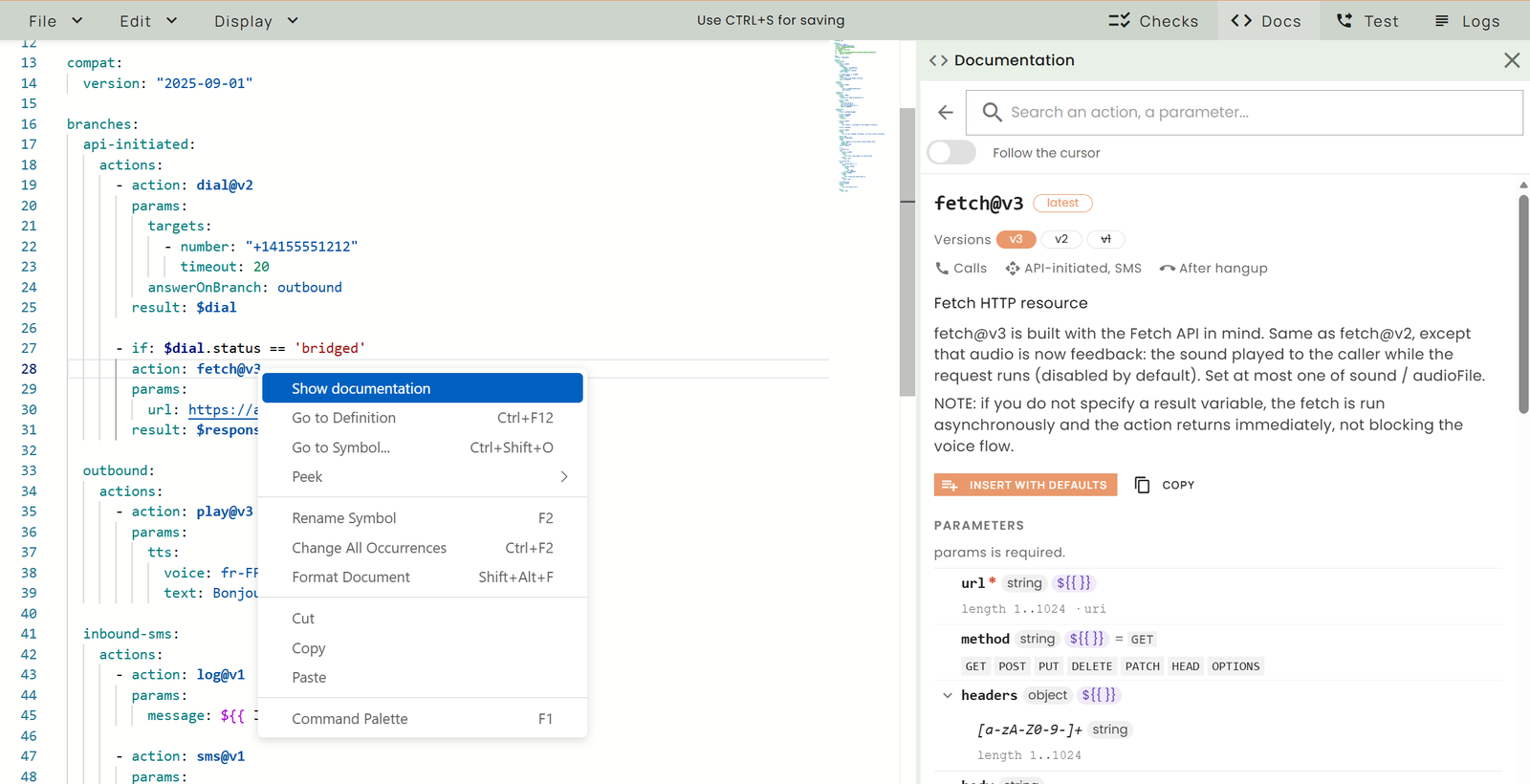
Right click > Show documentation opens the page of the action under the cursor.
- Always up to date. The Docs panel is built from the Callr Actions schema, the one the platform checks your scenarios with: every action, version, parameter, type, default value, range and allowed value is the one actually accepted. Search on action names, descriptions and parameters.
- One page per action. The latest version has a
latesttag and the other versions are chips next to it. The page tells where the action can run (Calls, API-initiated, SMS, After hangup), lists its parameters (required ones, mutually exclusive ones), describes its result and gives examples. Insert with defaults adds the action to your scenario under the cursor, at the right indentation; an example can be inserted the same way. A deprecated version points to the latest one, with Replace in the editor. - Show documentation (right click) works on an action, a parameter, a pre-defined variable in an expression (
call.cdr.callee) and a$variable($dial.statusopens the result of the action that writes$dial). Hold Ctrl (Cmd on a Mac) to underline everything that is documented, and Ctrl / Cmd + click to open it. - Follow the cursor keeps the panel on the action you are editing and highlights the parameter under the cursor.
- Concepts: expressions, variables, branches, conditions, goto, defaults, compat, a new Text-to-Speech page, and the Pre-defined Variables (
call,sms,recording,now...) grouped by availability: always, during a call, on an inbound SMS, when a recording is ready.
Results and variables while you type
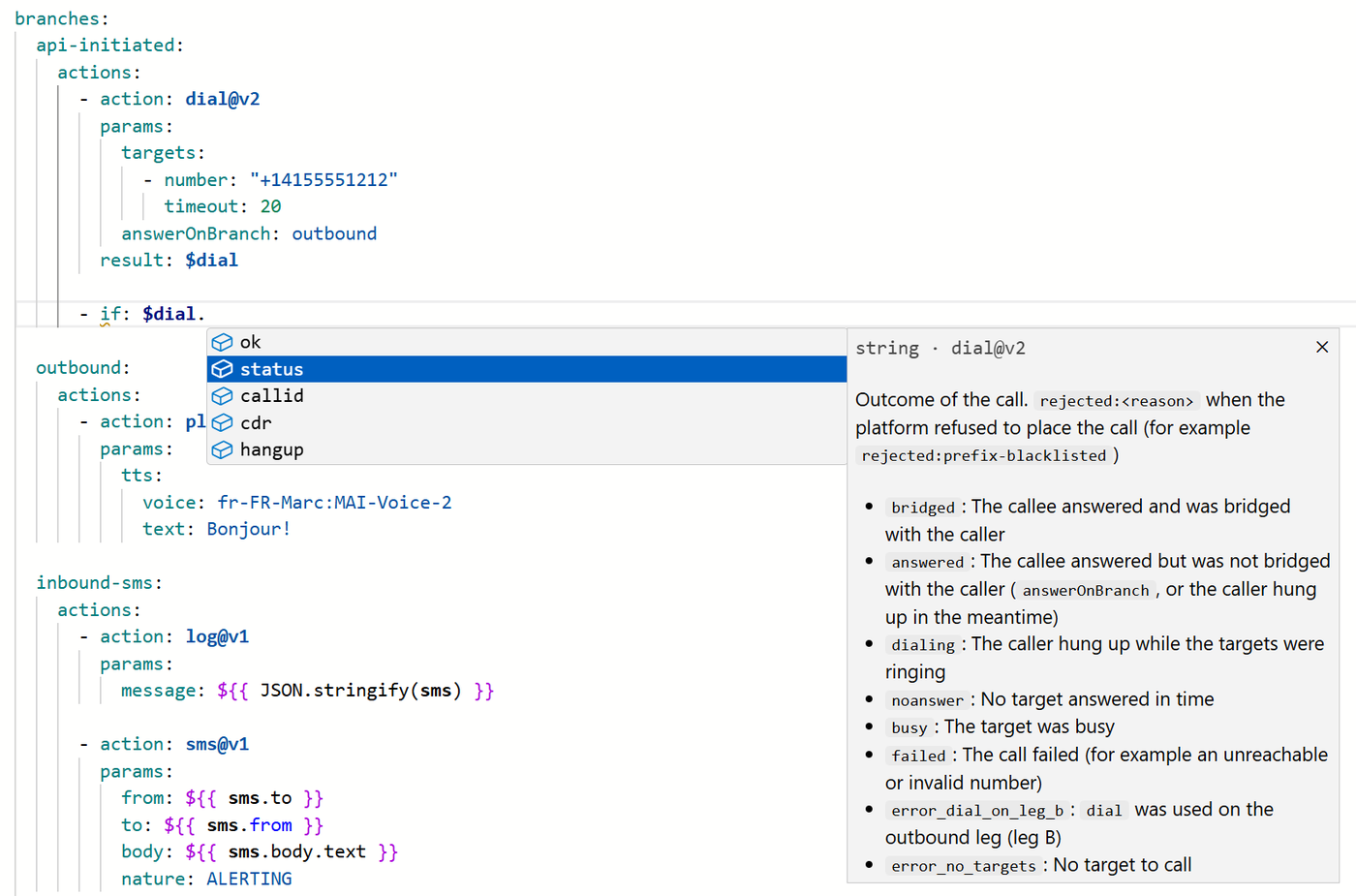
$dial. completes the fields of the dial@v2 result, with the meaning of each value.
- Result completion. Type
$dial.and the editor suggests the fields of the result of the action that writesresult: $dial, with their type and the meaning of each value. The same goes for$dial.cdr.and for every action with a result. - Pre-defined variables completion.
call.,sms.,recording.... are completed inside an expression:${{ }}, anif:value, the code ofjavascript@v1. - JavaScript colors. Expressions and
javascript@v1code are colored as JavaScript; action names and variables are in bold. - Logs. In the Logs panel, the fields of a result have a tooltip with their type and meaning.
Checks and saving
- Saving is always possible. A scenario with errors can be saved; once the platform has checked it, the notification tells how many errors it has. Calls and messages handled by the scenario may fail until they are fixed.
- One warning per deprecated action in Checks, with the version picker to switch to the latest one.
- Notices. When a newer version of an action exists, Checks shows a blue notice that you can resolve with the version picker. A notice is only advice: the older version keeps working, and a notice never counts as an error.
- Assign numbers from the Test panel. When the scenario has no number for inbound calls or SMS, the warning of the Test panel opens the number assignment.
A new template gallery
- Pick by goal. The gallery asks what you want to do: Route calls, Never miss a call, AI agents, Call data, Connect people, Reminders & alerts, SMS, Call tracking, Integrations. Each template has a preview (what happens, what you will edit, what you will need, the guide to read) before Use this template.
- 32 ready-made scenarios, among them a simple phone menu, routing by opening hours, missed-call SMS, SMS auto-reply, an AI receptionist, an outbound AI agent, an AI SMS agent, your own voice AI over SIP, routing by intent with AI, a conference room with PIN, buyer / seller call masking, voice OTP with SMS fallback, critical alert escalation, call tracking per campaign (GA4), Salesforce and HubSpot caller lookups.
- English and French. Every scenario exists in both languages; switch with the EN / FR toggle of the preview.
- On the latest versions. Every template uses the latest version of each action (
play@v3,gather@v4,recognize@v3,amd@v3,dial@v2,bridge@v3,fetch@v3,openai@v3). Scenarios created from a template before this change keep working as they are.
All the templates and their YAML are also in the docs: Callr Actions templates.
Fixes
- An expression is now accepted in the
urlof avoicebottool (for exampleurl: ${{ $url }}/search). The editor used to flag it as an error, although it worked. - Changelog is now linked from the help menu of the Console.
See the list of actions and the Language Reference.